Guide · Testing
PAC vs Acrobat vs axesCheck: which PDF accessibility checker to trust
Every checker gives a different answer for the same file. That is not a bug: they test different things. Here is what each tool is for, and the part no tool can do.
The short answer
Use PAC as the standard pass/fail check against PDF/UA, Acrobat Pro to find and fix problems, and a screen reader (such as the free NVDA) to confirm the document actually makes sense. Online checkers are good for a quick first look. No automated tool, including ours, can tell you a PDF is fully accessible.
The five tools
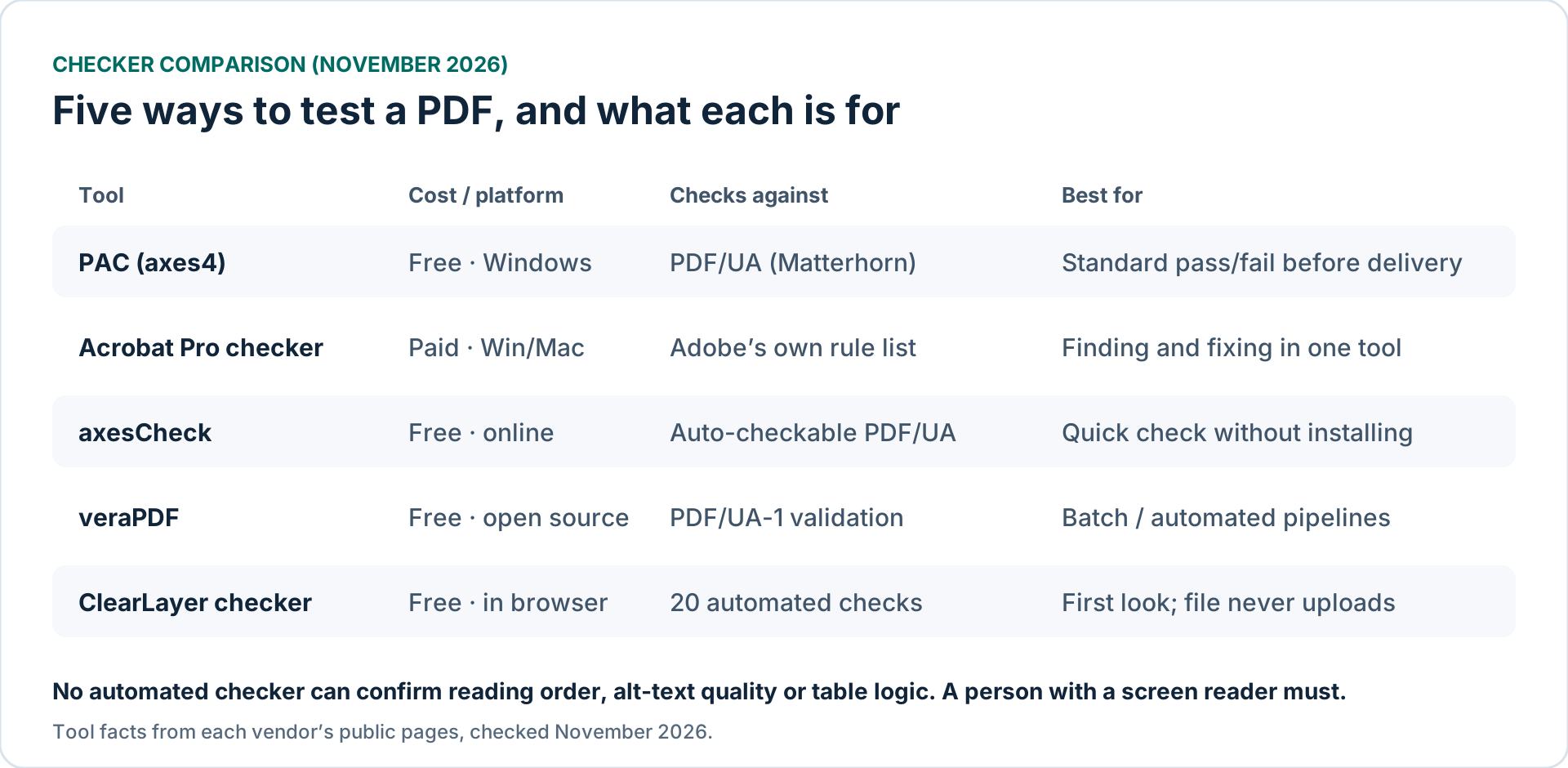
PAC (PDF Accessibility Checker)
A free Windows tool from axes4 that tests against PDF/UA (ISO 14289) using the Matterhorn Protocol, plus some WCAG-related checks. It includes a screen-reader preview and a logical structure view. Many government and university buyers ask for a clean PAC report, so it is the closest thing to a common yardstick.
Adobe Acrobat Pro accessibility checker
Built into the paid version of Acrobat on Windows and Mac. It checks Adobe’s own list of rules and, crucially, sits next to the tools you use to fix problems: the tags tree, reading order and form field properties. Its rule list is not the same as PDF/UA, so a file can pass Acrobat and still fail PAC.
axesCheck
A free online checker, also from axes4, covering the machine-checkable PDF/UA rules. Useful when you cannot install software. Read the upload terms before using it for confidential files.
veraPDF
An open-source validator for PDF/A and PDF/UA-1. It suits automated pipelines and batch checks rather than one-off reviews.
ClearLayer browser checker
Our free PDF accessibility checker runs 20 automated checks (tags, title, language, alt attributes, table headers and more), shows the tag tree and reading order, and prints a report. It runs entirely in your browser, so the file never leaves your device. It is a first look, and the report says so.
What no checker can confirm
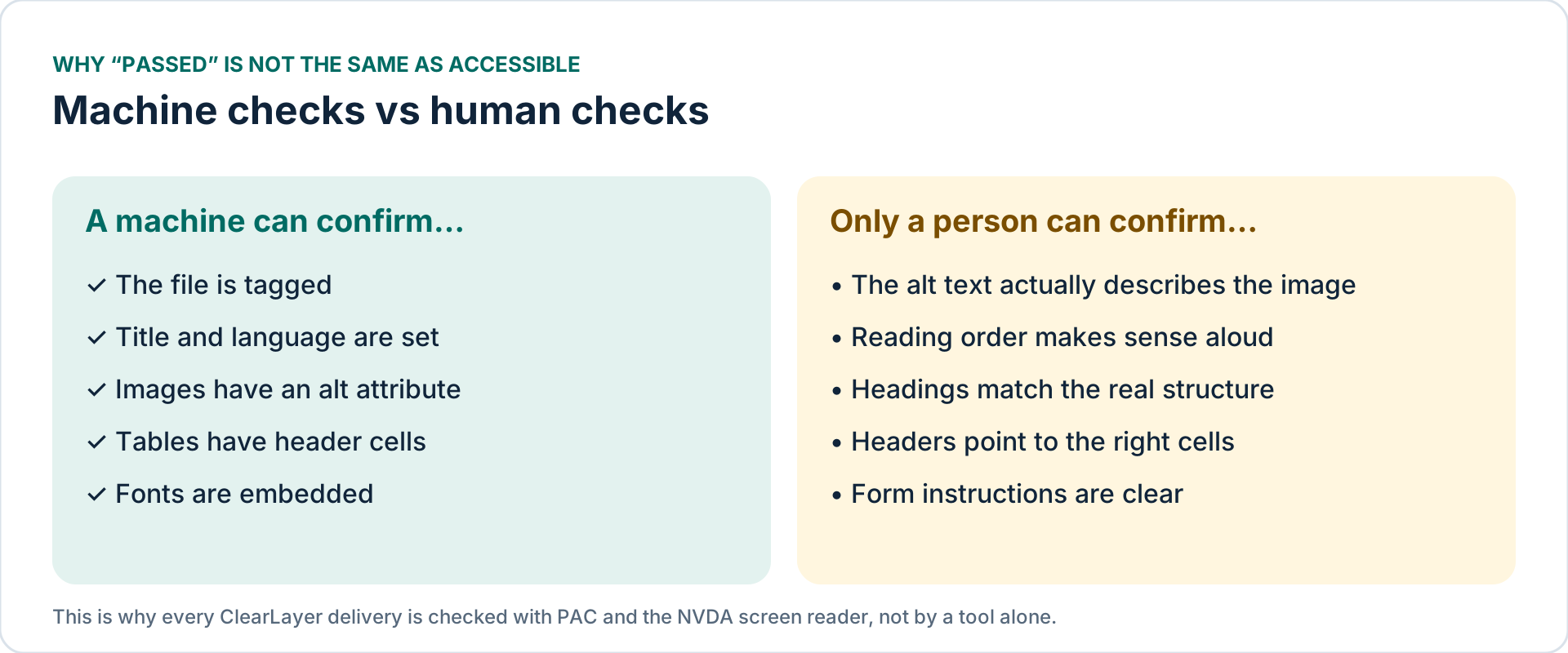
Automated tools check whether something exists, not whether it is right. A photo with the alt text “image1.jpg” passes the “has alt text” rule. A table with header cells in the wrong place passes “has headers”. This is why marketing claims of “automated compliance” are risky: in 2025 the US Federal Trade Commission finalised an order requiring accessiBe to pay $1 million over claims that its automated product could make websites WCAG-compliant (FTC, April 2025).
A workflow that works
- Triage with a quick automated check to spot untagged and scanned files.
- Fix in Acrobat Pro (or the source document) using the tags tree and reading order tools.
- Validate with PAC until it reports no PDF/UA failures.
- Listen to the document with NVDA: headings, reading order, alt text, tables and form fields.
- Record the result: a short test report per file, so you can show what was checked and when.
If you are buying remediation
- Ask for a PAC report and a note of screen-reader testing for each delivered file.
- Be wary of anyone promising “100% compliant” from an automated process.
- Ask for a sample on your own document before committing. Ours is free for up to 10 pages.
Prepared by ClearLayer Access. Published November 3, 2026; dates, rules and references checked against official sources on November 3, 2026. This guide is general information, not legal advice, and following it does not guarantee compliance or any legal outcome.
Frequently asked questions
There is no single best tool. PAC is the common standard for PDF/UA pass/fail, Acrobat Pro is best for fixing, and a screen reader such as NVDA is needed to confirm the document actually works.
They test different rule sets. Acrobat checks Adobe’s own list; PAC tests the PDF/UA standard using the Matterhorn Protocol, which is stricter in several areas.
Yes. PAC is a free Windows application from axes4.
No. Automated checks confirm that structures exist, not that they are correct. Alt text quality, reading order and table logic need a person.
Want files that pass PAC and make sense to a screen reader?
Send up to 10 PDF pages for a free test. You get the remediated files and a short test report.