Guide · Pricing
How much does PDF remediation cost in 2026?
Most vendors price PDF remediation per page. The price per page depends on what is on it. Here are public reference prices and the factors that move them.
The short answer
For ordinary documents, published per-page prices from established vendors sit roughly between $4 and $14 per page. Fillable forms and scanned pages are where prices spread out: from about $8 to more than $60 per page on one university’s approved list, and one government reseller, writing about fillable forms, says hand remediation commonly runs $50 to $200 per page.
Harvard University publishes the rates of its approved document remediation vendors. These are selected institutional reference prices for two vendors, not a survey of the national market, but they are among the few published figures:
| Vendor | Simple | Complex | Forms or scanned (OCR) |
|---|---|---|---|
| GrackleDocs | $5.50 | $13.20 | $60.50 |
| Documenta11y | $4 | $8 | $8 |
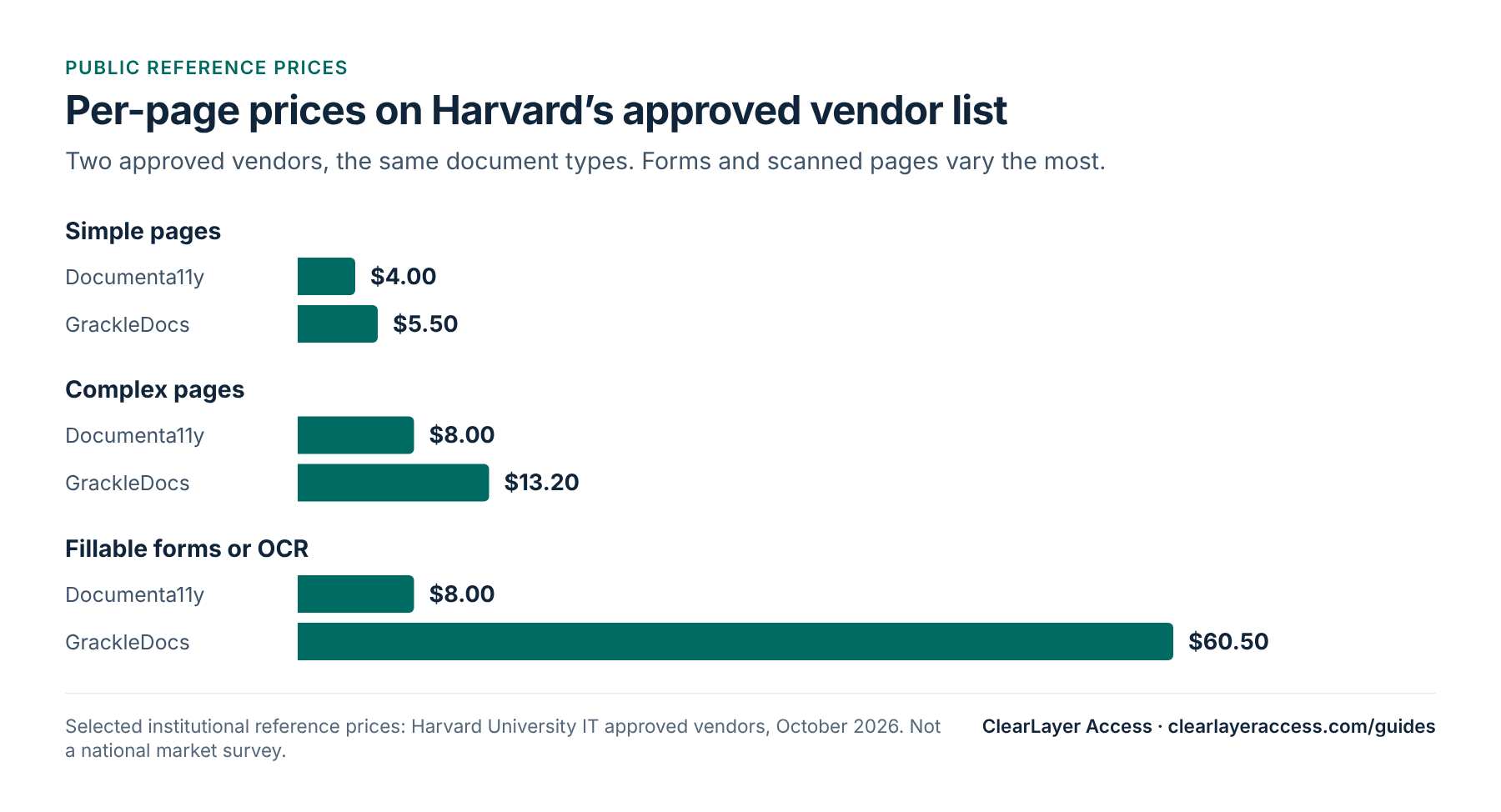
Look at the conditions as well as the numbers. Harvard’s list notes, for example, that one vendor adds 25% for rush work and does not change colors, while the other adjusts color contrast on request. Two prices that look similar can cover different work.
What drives the price
Remediation is skilled manual work in tools such as Adobe Acrobat. Time per page rises with the amount of structure a page holds:
- Plain text pages need headings, paragraphs and lists tagged correctly. They are the quickest.
- Images and charts need someone to write useful alternative text, which takes judgment, not just tagging.
- Tables need header cells and, for complex tables with merged cells or several header rows, explicit links between data and headers.
- Fillable forms need every field named, described and placed in a logical tab order, with instructions that a screen reader announces.
- Scanned pages are pictures of text. They need text recognition (OCR) and checking before any tagging can start, and poor scans may need retyping.
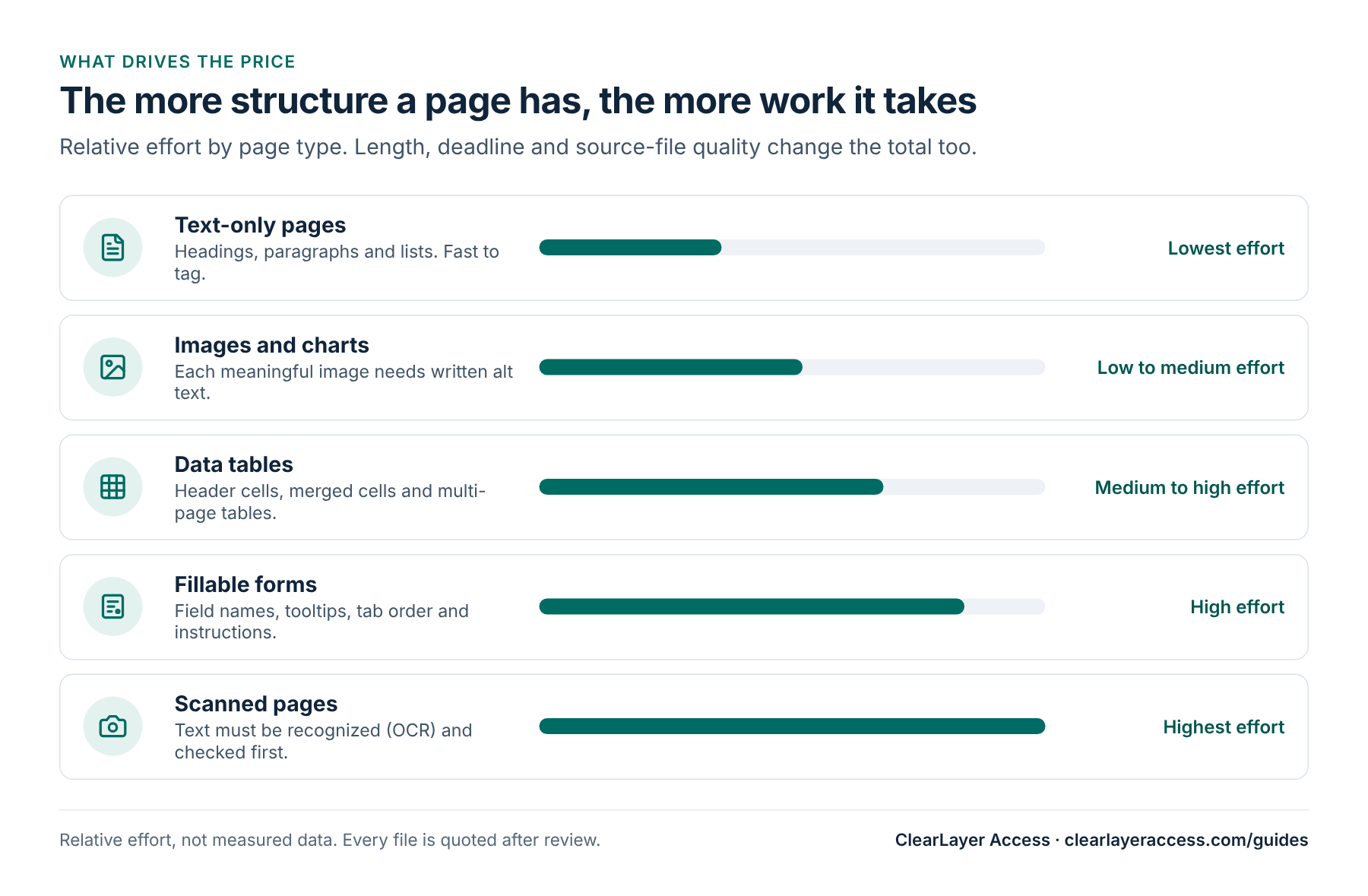
Other factors change the total: the number of pages (long documents built from one template are efficient), the turnaround you need, whether source files such as Word documents are available, and the standard agreed, for example WCAG 2.1 AA alone or PDF/UA as well.
Manual, automated or both
Automated tagging tools are cheaper per page and can be a useful starting point for simple documents. Their results vary: automatic tags often get the reading order, table headers and alt text wrong. Whatever method a vendor uses, ask how the output is checked. A credible answer includes an automated checker such as PAC and a manual review with a screen reader.
ClearLayer Access pricing
Our document remediation prices are listed on our site:
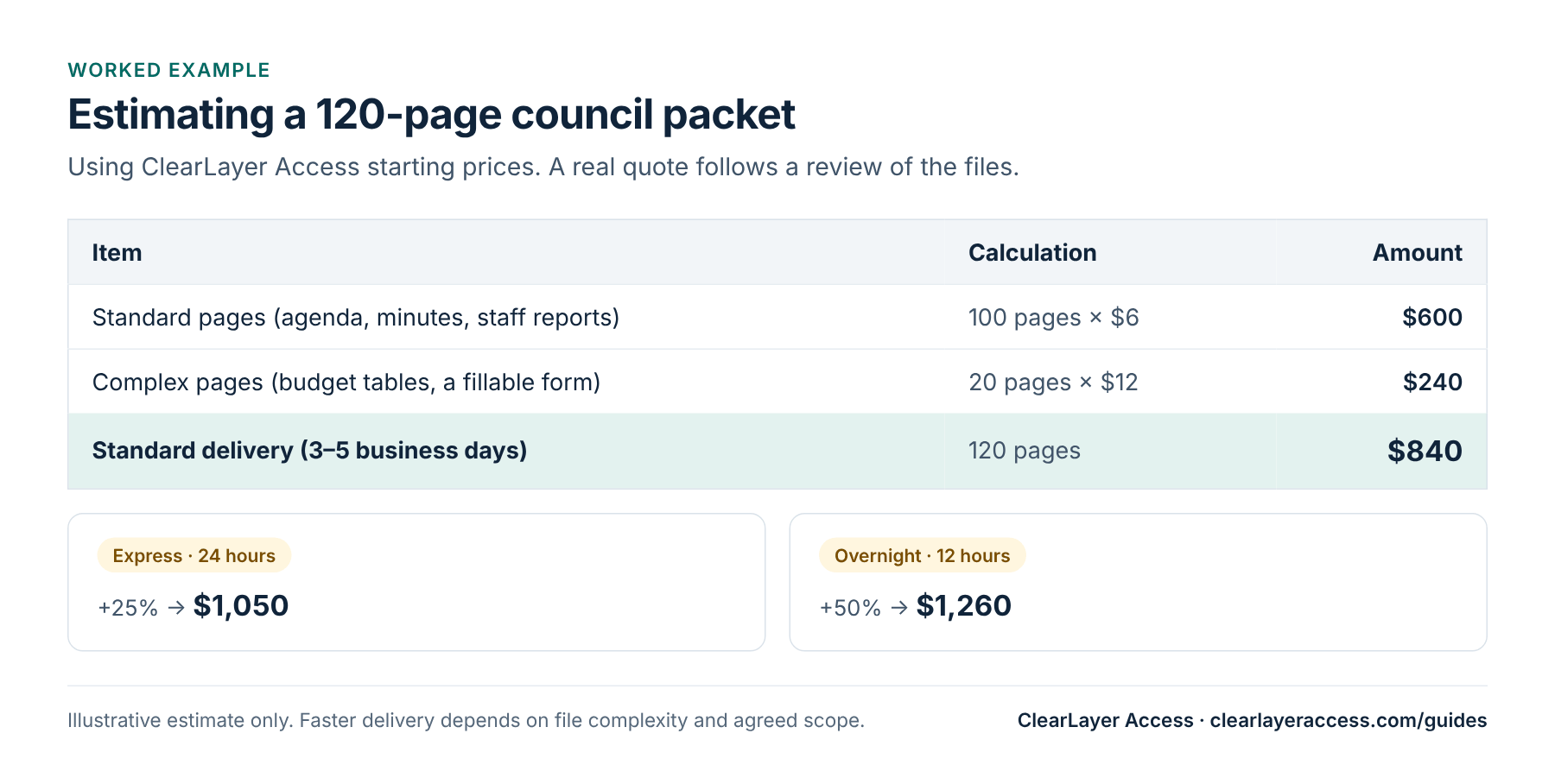
- From $6 per page for standard pages.
- $12 per page for complex tables. Our ADA Title II page lists complex tables and forms at $12 per page.
- Standard delivery in 3–5 business days at the listed price; Express (24 hours) adds 25% and Overnight (12 hours) adds 50%, with overnight PDF delivery of up to 200 pages, subject to complexity and agreed scope.
- Scanned (image-only) pages and some complex layouts may have limitations, which we discuss during scoping. The final price is confirmed in a written quote.
Every job includes testing with PAC and the NVDA screen reader and a short summary of the results.
How to get an accurate quote
Vendors can only price what they can see. You will get a faster, firmer quote if you send:
- A representative sample: one typical file and the hardest one, such as the budget or a long form.
- The total page count, split roughly into plain pages, table-heavy pages, forms and scans.
- Whether Word or InDesign source files exist.
- Your deadline and whether files can be delivered in batches.
- The standard you need, for example WCAG 2.1 AA for ADA Title II, and any PDF/UA requirement.
Then ask each vendor the same questions: Is alt text writing included? Are color contrast fixes included? Which tools do you test with? What do I receive besides the files?
Per page, per document or per hour
Per-page pricing is the most common model because it scales with the work and is easy to compare. You will also see:
- Per-document pricing for short, predictable files such as one-page notices. It is simple, but check what happens when a document turns out to be long or complex.
- Hourly rates for updates. Harvard’s list notes, for example, that one vendor makes updates of under an hour free and bills longer ones at $60 per hour. Ask how corrections and new versions of a remediated file are charged.
- Minimums. Some vendors set a minimum charge per document or per order; others, according to the same list, have no fixed minimum.
To budget a backlog, start from an inventory of your documents with page counts. Review a random sample of 20 to 30 files to estimate what share of pages are plain text, tables, forms and scans, then apply each vendor’s rates to those shares. The estimate will not be exact, but it will be close enough to plan a fiscal year.
What you should receive
A remediation price should buy more than a re-saved file. Ask for:
- The remediated PDF, tagged, with title, language and reading order set.
- A short test summary showing which tools were used, such as PAC and a screen reader, and the results.
- A list of anything that could not be fixed in the PDF, for example color contrast in a designed brochure or a chart that needs a data table, with a recommendation.
- Advice on source templates, so the next version of a recurring document needs less work.
Ways to spend less
- Fix templates first, so new documents need little or no remediation.
- Retire outdated files from your website, following your records retention schedule, rather than paying to remediate documents nobody needs online.
- Publish simple content as web pages instead of PDFs where it makes sense.
- Batch the backlog at standard turnaround and reserve rush delivery for genuine deadlines.
To check quality before you commit, eligible organizations can send up to 10 pages for our free PDF test.
Prepared by ClearLayer Access. Published October 31, 2026; dates, rules and references checked against official sources on October 31, 2026. This guide is general information, not legal advice, and following it does not guarantee compliance or any legal outcome.
Frequently asked questions
Each field must be named, given instructions and placed in a logical tab order, and the form must still work with a screen reader and a keyboard. That is slow, careful work, so forms are often priced several times higher than text pages.
Not always. Compare what is included, such as alt text writing, contrast fixes and testing, and ask for a sample. A low price that leaves the reading order or tables wrong means paying twice.
It can help with simple documents, but automated tags are often wrong for reading order, tables and images. Any automated output should be checked with a tool such as PAC and reviewed with a screen reader.
From $6 per page for standard pages and $12 per page for complex tables, at standard 3–5 business day delivery. Express adds 25% and Overnight adds 50%. The final price is confirmed in a written quote after we review your files.
See the quality before you buy.
Send up to 10 PDF pages for a free test and get the remediated files with a short test report.
Up to 10 PDF pages for eligible organizations.