Guide · Planning
How to inventory every PDF on your website before the Title II deadline
Most public websites hold hundreds or thousands of PDFs, and nobody knows the real number. You cannot budget or prioritise until you do. Here is a method that costs nothing but time.
The short answer
Build one spreadsheet of every PDF your public website links to, with its URL, title, page count, date and the page that links to it. Then sort each file into one of four buckets (fix, archive, retire, individual) and price only the “fix” bucket. A small city site can usually be inventoried in a day or two.
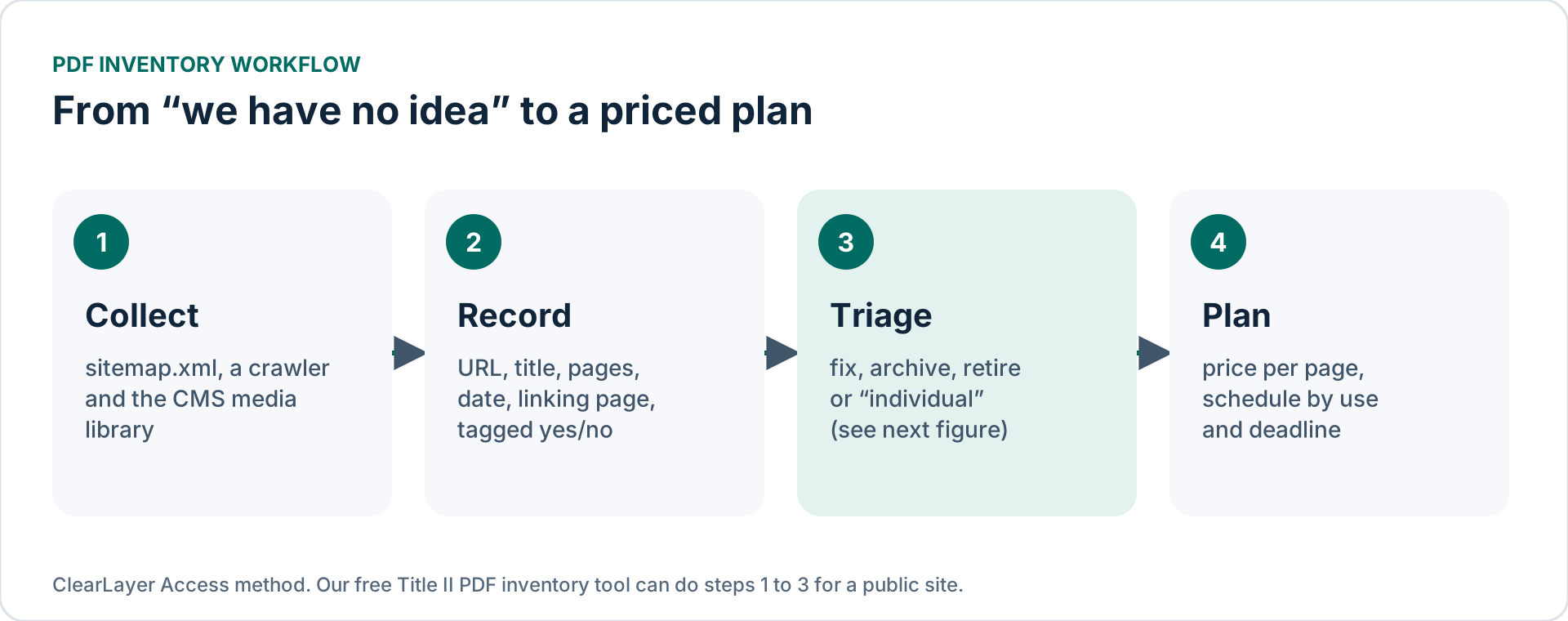
Step 1: collect every PDF URL
No single source finds everything, so combine three:
- Your sitemap. Open
/sitemap.xmlon your site. Some content systems list documents; many list only pages. - A crawler. Free desktop crawlers (for example the free tier of Screaming Frog SEO Spider, which crawls up to 500 URLs) list every linked file. Filter the results to addresses ending in
.pdf. - The media library of your content system (CivicPlus, Granicus, WordPress and others). It also shows files that are uploaded but no longer linked; those are often the easiest to retire.
A quick sanity check: search Google for site:yourcity.gov filetype:pdf. The count is rough, but it shows whether your list is in the right range.
Shortcut: our free Title II PDF inventory tool crawls a public website, lists the PDFs it can reach with page counts and dates, and sorts each one into a likely group. Check its list against your media library: it cannot see files behind logins or on other domains.
Step 2: record what matters
Keep the columns few. These are enough to make decisions:
| Column | Why it matters |
|---|---|
| URL and title | Identifies the file |
| Linking page | Shows who owns it and whether it is still in use |
| Page count | Drives cost (remediation is priced per page) |
| Date posted or last modified | Needed for the pre-existing document and archive exceptions |
| Tagged? Scanned? | Untagged or scanned files take longer |
| Type | Agenda, minutes, form, notice, report, map… |
| Bucket and owner | Filled in during triage |
To fill the “tagged” and “scanned” columns quickly, drop files into our free PDF accessibility checker. It runs in your browser, so files never leave your computer.
Step 3: triage
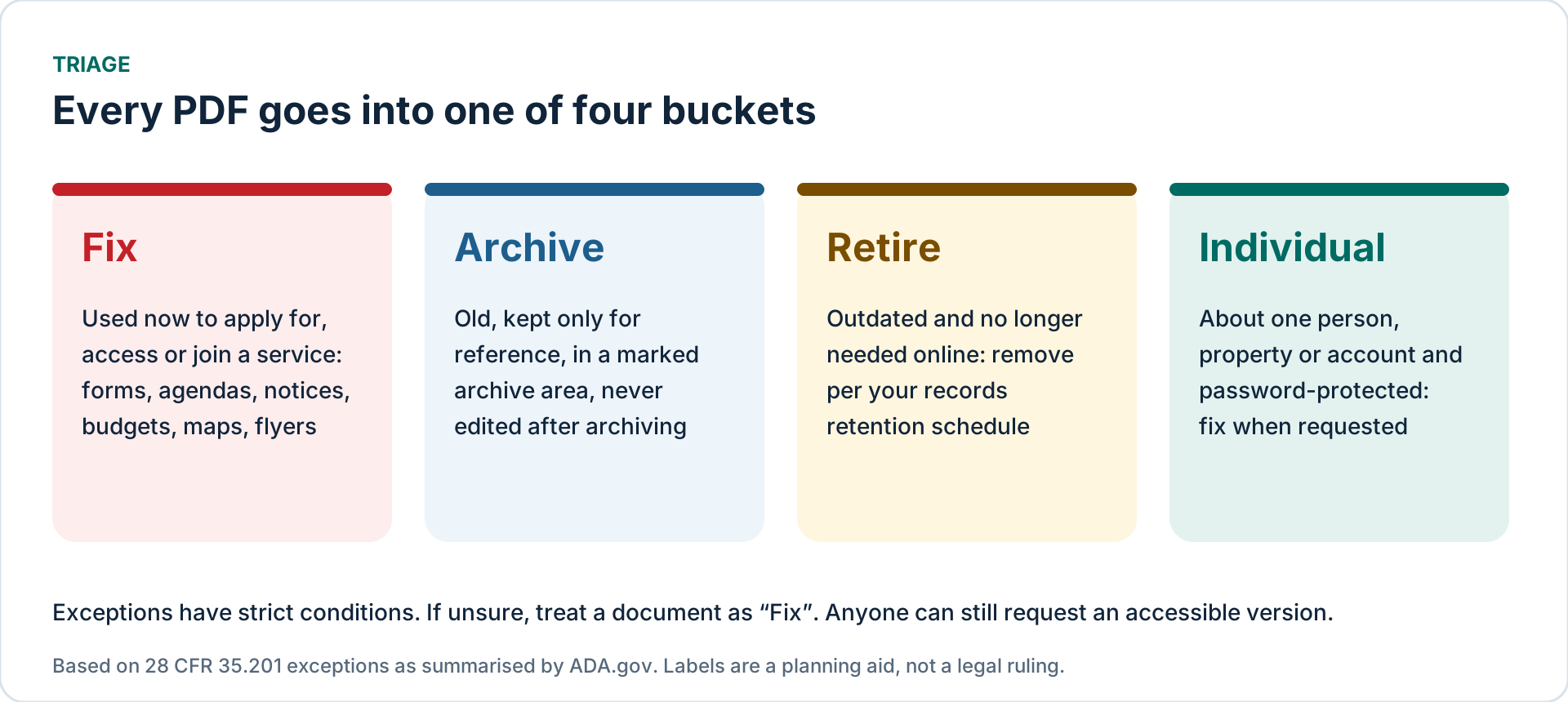
The Title II rule has five exceptions, and two of them matter most for PDFs. Pre-existing conventional electronic documents posted before your compliance date are excepted unless they are currently used to apply for, access or participate in your services. Archived web content is excepted only if it was created before the compliance date, is kept only for reference, research or recordkeeping, sits in an area clearly marked as an archive, and has not been changed since it was archived (ADA.gov).
So a 2019 budget kept in a labelled archive can stay as it is; a 2019 permit application form that residents still download cannot. And anyone can still ask for an accessible version of an excepted file, so you need a fast way to provide one.
Step 4: price and plan
- Total the pages in the “fix” bucket, split into simple, complex (tables, charts) and forms or scanned pages.
- Price them with published per-page ranges (see PDF remediation cost in 2026) or ask for a written quote.
- Order the work: high-use forms and recurring templates first, then current notices and reports, then everything else.
- Stop the backlog growing: fix agenda and minutes templates so new documents are born accessible (see our clerk checklist).
Mistakes to avoid
- Moving everything into an “archive” folder. The archive exception has strict conditions; a folder name alone does not meet them.
- Deleting files without checking records rules. Follow your records retention schedule before removing documents.
- Counting files instead of pages. One 200-page budget costs more than fifty one-page flyers.
- Trusting an automated score. A file that passes an automated check can still be unusable with a screen reader.
Prepared by ClearLayer Access. Published November 3, 2026; dates, rules and references checked against official sources on November 3, 2026. This guide is general information, not legal advice, and following it does not guarantee compliance or any legal outcome.
Frequently asked questions
Combine your sitemap, a website crawler filtered to .pdf links, and your content system’s media library. A Google search for site:yourdomain filetype:pdf gives a rough cross-check.
Not always. Pre-existing documents posted before your compliance date are excepted unless they are used to apply for, access or participate in services, and archived content is excepted if it meets all four archive conditions. Accessible versions must still be provided on request.
You can retire files nobody needs online, but follow your records retention schedule and keep documents people still rely on.
For a small city or district site with a few hundred PDFs, usually one to two days with a crawler and a spreadsheet; larger sites take longer mainly because of triage decisions.
Have your list? Get it priced.
Send your inventory or up to 10 PDF pages for a free test. We reply with a written quote.